
Page builder
Elements and ready-made sections.
Beyond headings, text and images: galleries, tabs, accordions, carousels, maps, pop-ups, counters, countdowns and more – plus display conditions.
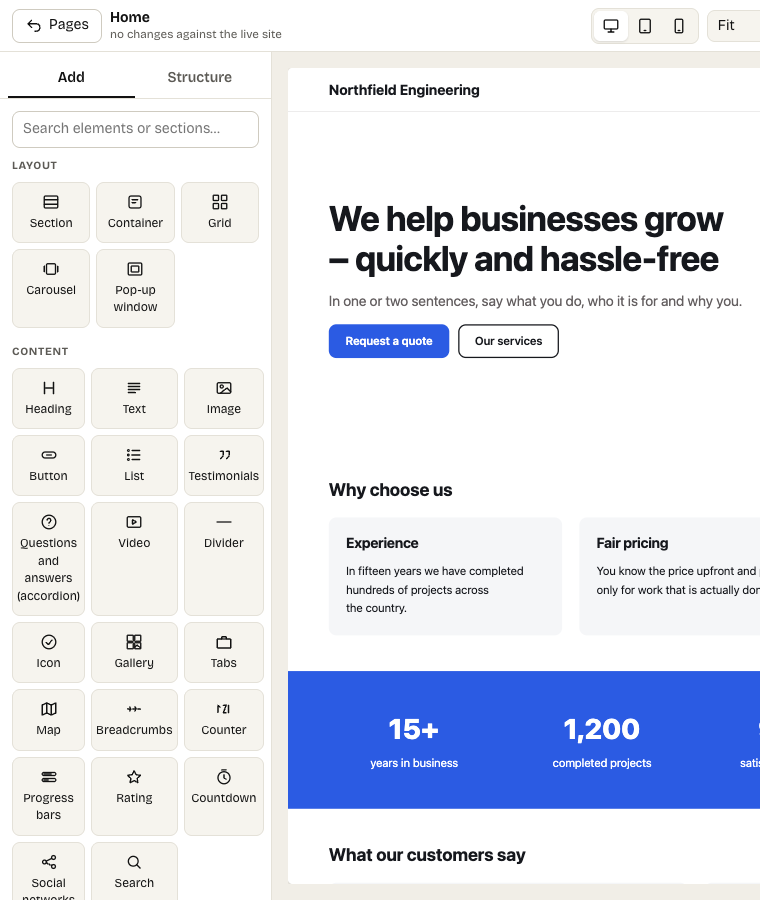
The Add panel: elements grouped by purpose and ready-made sections
The Add panel offers basic elements (heading, text, image, button, list, container, grid…), ready-made sections for whole parts of a page and the elements below.
More elements
- Media: icon, photo gallery with a viewer, video (with a poster), map – it loads only after a click, so no third-party request without consent.
- Interactive: tabs, accordion and FAQ, carousel, pop-up window, back-to-top button.
- Numbers: counter, progress bars, star rating, countdown.
- Site-wide: breadcrumbs, search, social networks, newsletter sign-up, company details.
- Dynamic: News, Collection list (also related items on an item page), Form and Component.
Sections support a background video, background images a parallax effect, and navigation a mega menu.
Pop-up windows
The Pop-up window element belongs to one page: a button that links to #window-anchor opens it, or it opens on its own after a delay, after scrolling or when the visitor is about to leave. For a pop-up on the whole site – with rules, frequency and results – use Appearance → Pop-ups.
Display conditions
In the Advanced tab you can show an element only between two dates (a promo banner) or only to visitors, or only to signed-in users.
Custom HTML
The Custom HTML element embeds code of another service (a booking widget, a map). Only administrators can insert and change it; scripts are removed.