
News, forms and company
Forms and enquiries.
Add an enquiry form in the builder. Messages land in Enquiries and your inbox; spam is stopped without CAPTCHA or cookies.
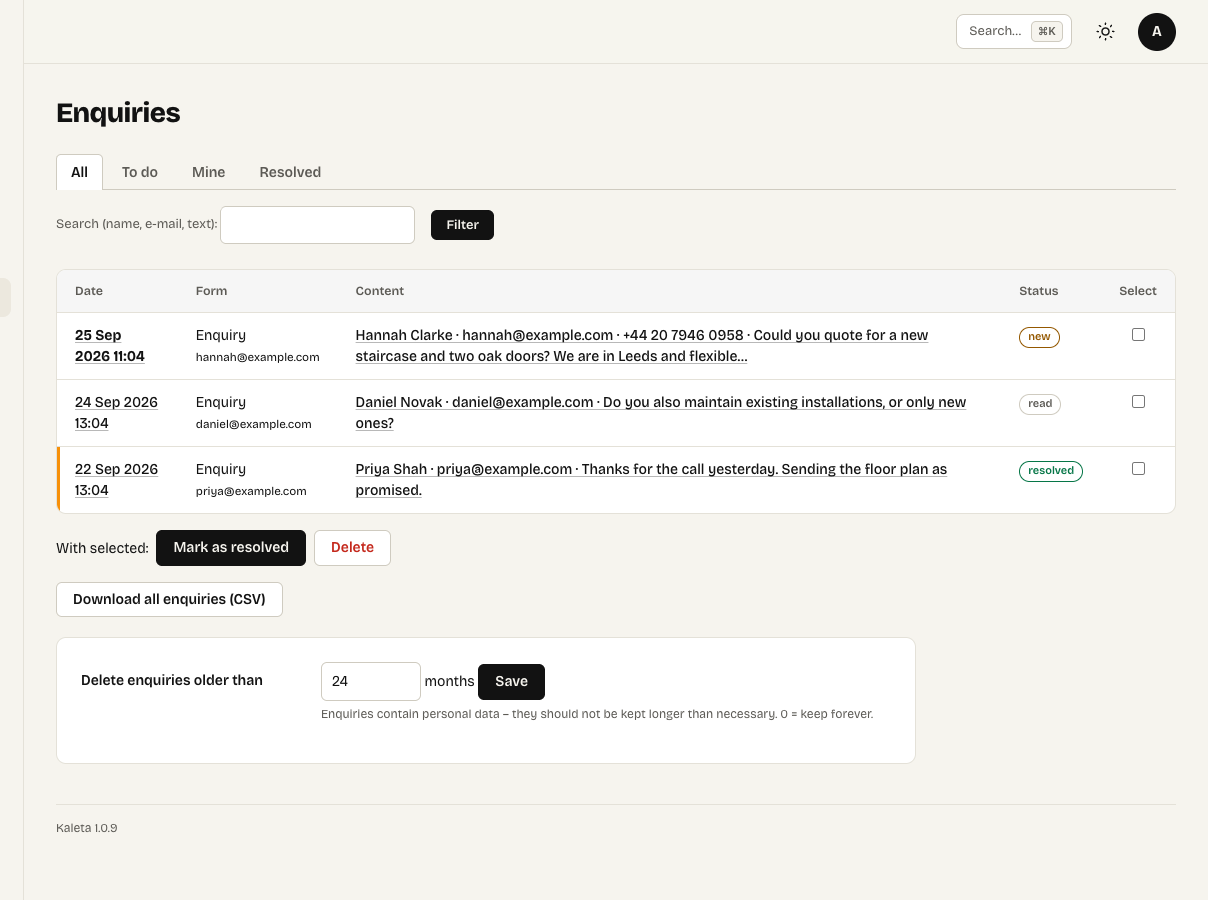
Content → Enquiries with statuses
The Form element
Insert the Form element or the Enquiry form section. In the Content panel set:
- the fields – text, e-mail, phone, list, radio buttons, date, number and consent;
- the button text, a thank-you message or a thank-you page;
- an optional confirmation to the sender and the notification e-mail address.
Hidden fields, a signed time check and a submission limit per address stop spam – no puzzle for your visitors and no cookies.
Enquiries
Submitted messages are in Content → Enquiries with a status (new, read, resolved). Reply by e-mail right from the admin or export to CSV. Enquiries contain personal data, so they are deleted automatically after a set number of months (24 by default).
Which campaign brought the enquiry
When the form is on the page an ad or a newsletter links to, the enquiry also records the campaign from the page address – utm_source, utm_medium, utm_campaign, utm_term and utm_content. You see it in the enquiry, the notification e-mail, the CSV export and the webhook. It needs no cookies: Kaleta reads it from the address of the page the form was sent from.
Connecting other tools
- CRM, Make or Zapier: Settings → General → New enquiry webhook sends every new enquiry as JSON, with the campaign in a
utmobject. - Conversion tracking: a successful submission fires a
kaleta:odeslanoevent and adds adataLayerentry.